
Editor, MCP, API or Git: how your team should write docs
Writers want an editor. Engineers want a pull request. Agents want a tool call. Pipelines want an endpoint. In DeveloperHub each of them gets its own way in, and every one of them lands on the same pages.

Ask who writes your docs and the honest answer used to be "the writer, and occasionally an engineer under protest".
Ask today and it is more like this: a technical writer, two engineers, a support lead who keeps fixing the same FAQ, a CI job that uploads the OpenAPI spec, and at least three AI agents, one of which somebody set up on a Friday and has not mentioned since.
Most docs tools make you pick who they are for. Choose a visual editor and your engineers quietly stop contributing. Choose docs as code and your writers, product managers and support team quietly stop contributing. Either way, half the people who know things stop writing them down.
We do not think you should have to choose. So DeveloperHub has four ways in: the editor, MCP, the API, and a Git repository. The useful question is not which one your team uses. It is which one each person, or each agent, uses.
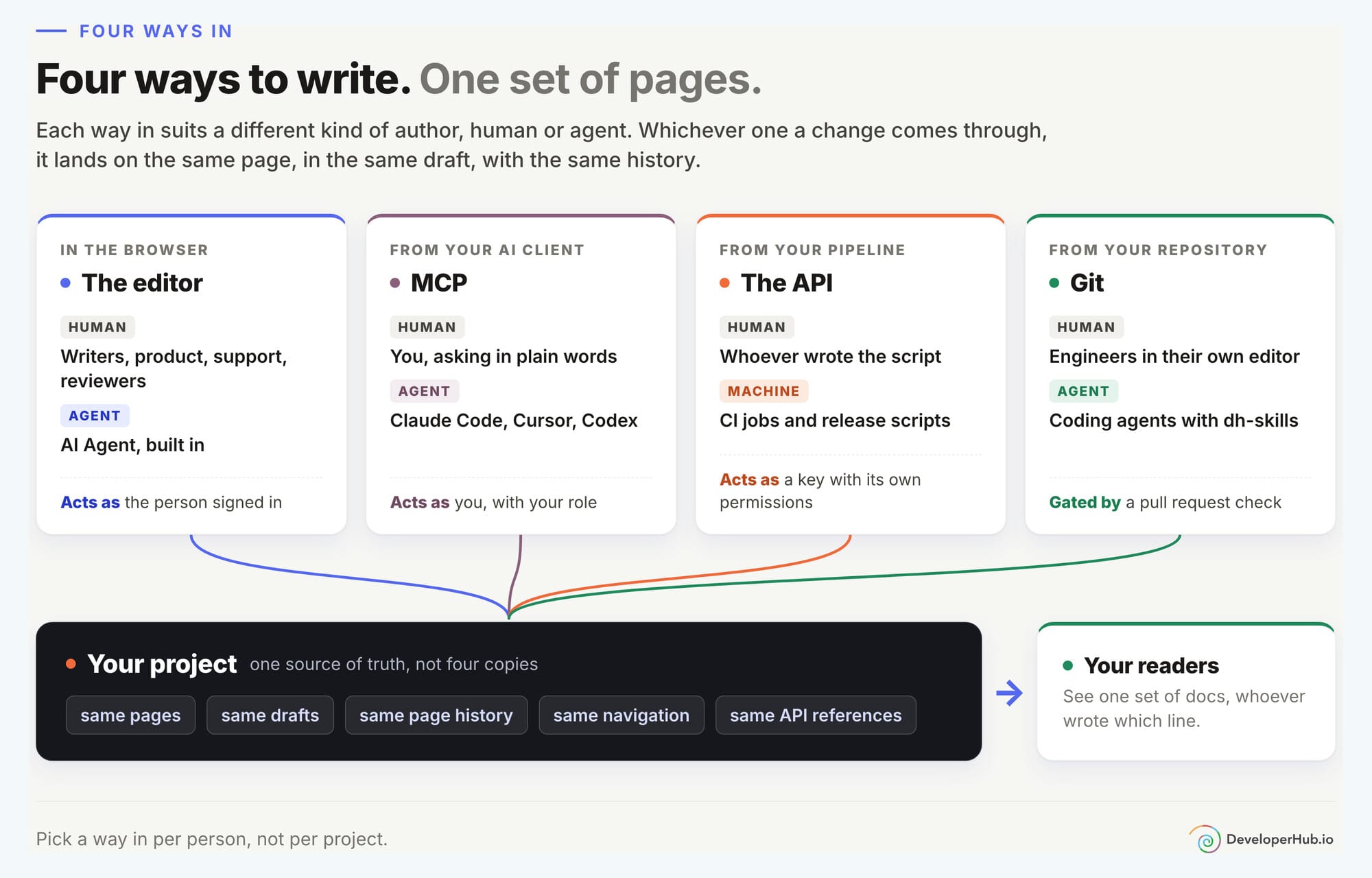
The part that makes this work is the boring part. All four write to the same pages. Not four copies, not an export somebody reconciles on a Thursday. The same pages, the same drafts and the same page history. A page can be started in the editor, updated by an agent over MCP, touched by a pipeline and fixed in a pull request, and it is still one page with one history.
Here is what each way in is for, who it suits, and what to watch for.
1. The editor: for everyone who would rather not see a terminal
Who it is for: technical writers, product managers, support teams, subject matter experts, and whoever reviews all of it.
The editor is where most people start, and for a lot of people it is where they should stay. You write in place, and what you see is what your readers get: no split view, no preview pane to keep in sync.
- Type
/on an empty line to add any block: callouts, tabs, code, tables, cards, accordions and the rest. Markdown shortcuts work too, if your fingers insist. - Paste from Google Docs, Notion or Confluence and your headings, lists, tables and links come across intact.
- Edit a live page in draft mode. Readers keep seeing the published version until you publish the new one.
- Leave comments anchored to the exact sentence, tag a teammate with
@, and resolve the thread when it is done. - Give people the right role. Writers draft, publishers publish, reviewers read and comment.
And the agent that lives inside it
The editor also has an agent built in. AI Agent takes a request in plain words and works across your whole version: pages, API references and changelog posts, in one go.
- "Fix all the broken links in this version."
- "Rename the
legacy_tokenparameter toapi_tokeneverywhere it appears." - "Find the reader searches that returned nothing, and fix the pages that should have answered."
It knows which page you have open, so "tighten this up" works without naming anything, and you can type @ to point it at a page, an API reference, or a file in your code. Tell it a house rule once, like always using British spelling, and it remembers it for everyone on the project.
Crucially, it proposes and you decide. Every change is staged. You go through it line by line, accept one section and reject the next, then save to a draft or publish.
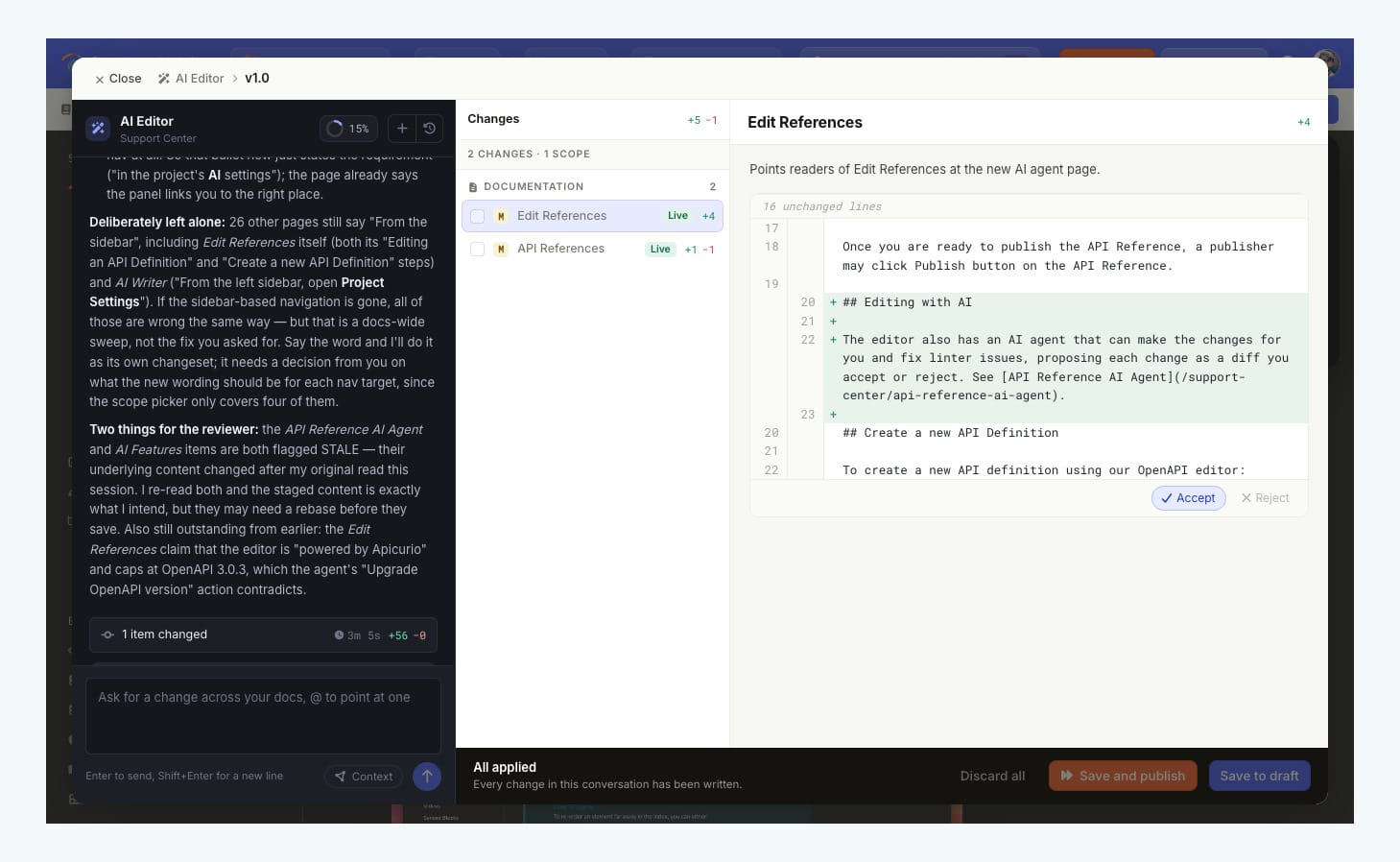
Attach your product's repository and it goes one step further. With Self-Updating Docs turned on, the agent reads each new pull request on your code, works out which docs it makes wrong, and stages the fixes for a person to review. It only ever reads your code. It never commits, and it never publishes.
Whatever the agent reads, your pages or your code, goes only to model providers with zero data retention. It is never stored, and never used to train a model.
Best for: anything that needs an eye on the layout, anyone who is not an engineer, and big changes across many pages where you want a proposal to review rather than a surprise.
Worth knowing: AI Agent needs a plan with AI features, an admin has to turn it on, and each run spends AI credits. The editor itself is not scriptable. That is what the other three are for.
2. MCP: for people who already live inside an AI client
Who it is for: engineers working in Claude Code, Cursor or Codex, writers who already draft with an AI, and anyone who would rather ask for a docs change than go and make it.
If you spend your day in an AI client, your docs are one more tab you have to go to. The Editor MCP server removes the tab.
An admin turns it on for the project, and then it is one command:
claude mcp add --transport http developerhub https://ai.developerhub.io/mcp
Cursor, Codex and anything else that speaks MCP take the same URL in their config.
There is no API key to create or pass around. The first time you connect, a browser page asks you to allow access, and from then on the agent acts as you. It reaches only the projects you can already edit, with your role and nothing more. Remove someone from the project and their agent loses access with them.
Once connected, your agent can search and read your pages, create and edit them, publish them, replace an API reference's draft spec, check a page or a whole version for broken links, and read your search analytics and reader feedback to decide what to write next. It also speaks our dialect: it can ask the server for the Markdoc reference and validate a page before saving it, so custom blocks do not quietly decay into plain text.
And nothing goes live by accident. Body edits land in the page's draft, and publishing is a separate, deliberate step.
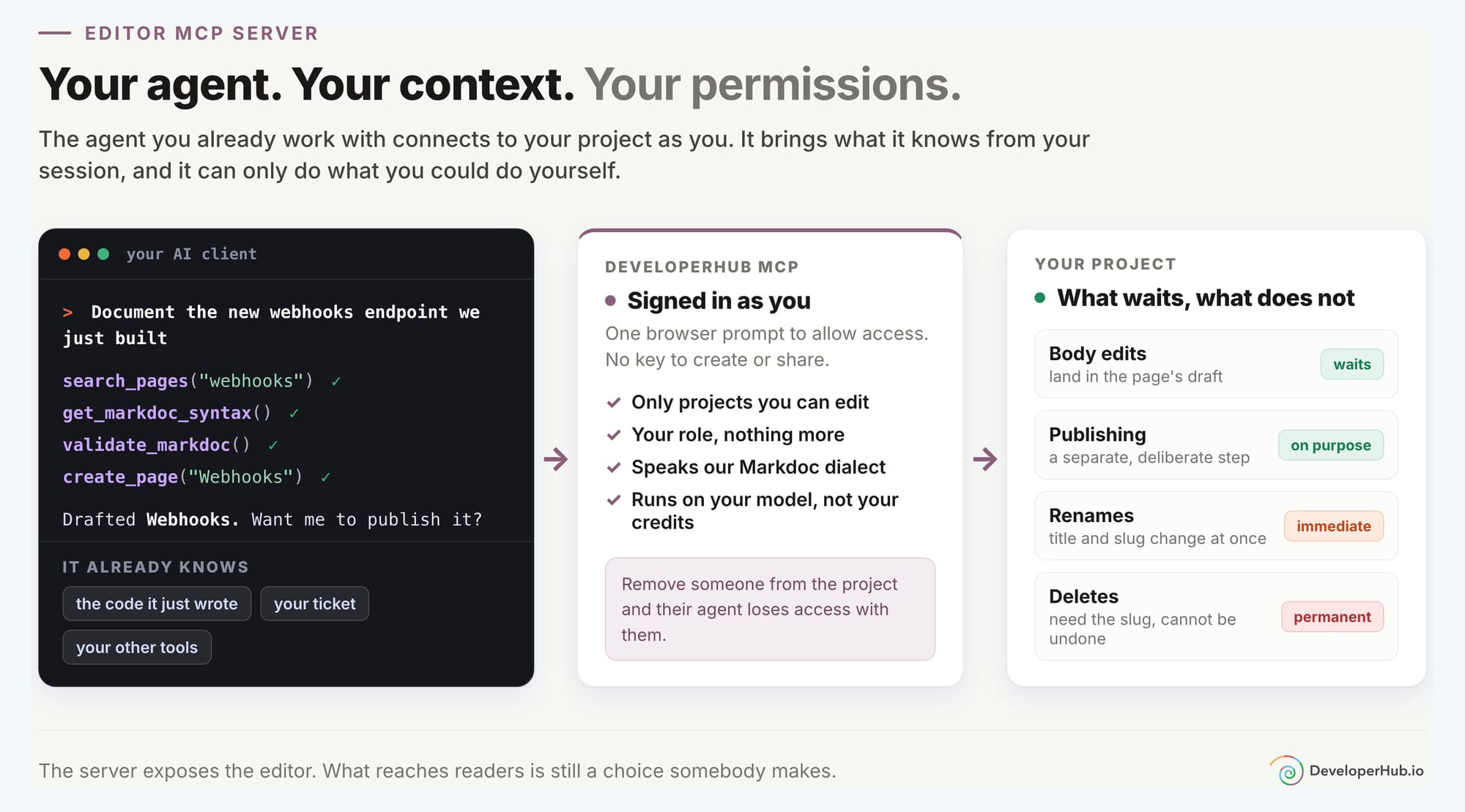
The best reason to use it is context. The agent that just helped you build a feature knows exactly what it does, because it wrote half of it. Ask it to document the feature in the same session and it writes from the code it just touched, not from a ticket description written three weeks ago. If your client is also connected to your issue tracker or your other tools, it can pull from those too.
Built-in agent or your own? Use the built-in AI Agent when you want the review screen, runs that start from pull requests, and something your non-technical teammates can use without installing anything. Use MCP when the agent you already have knows something ours does not: the code on your machine, the ticket you are working on, the conversation you have been having for the last hour. MCP runs on your own AI client and your own model, so it does not spend your project's AI credits, and your content goes only where your client already sends it.
Best for: engineers documenting a feature the moment it ships, writers who already work with an AI, and one-off sweeps like "find every page that mentions the old limits and update them".
Worth knowing: the agent can do anything you can do, so its reach is your reach. Drafts protect your readers from half-finished edits, but renames take effect straight away, and a deleted page is gone for good.
3. The API: for pipelines, not people
Who it is for: platform and DevOps engineers, and anyone whose docs content is generated somewhere else.
Some docs should not be written by anyone. They should be produced, the same way, every release, forever. That is what the REST API is for.
Admins can create as many API keys as a project needs, one per team or per job, and each key carries its own permissions. The release pipeline's key can push API references and nothing else. A content sync's key can edit pages without being able to publish them. Revoke one and the others carry on. Content goes in and comes out as Markdoc.
A few things teams wire up with it:
- Push your OpenAPI spec on every merge. Upload the spec and a reference with the same title is updated, or a new one is created. Pass
publish=falseto stage it as a draft for someone to check first. - Post release notes when you tag a release. Create a changelog post from your release script, published straight away or left for someone to release.
- Cut a docs version when you cut a product version. Cloning a version copies every documentation section, page and API reference into a new one, repoints the internal links, and leaves it unpublished until you say so.
- Fail the build on broken links. The broken links report returns every broken or risky link in a version, with the page, the link text, and a plain-English reason.
- Generate pages from a source of truth. Error codes, CLI help, configuration options: create or update the page from wherever the truth lives, then publish it.
A release script can be this short:
# Push the new spec as a draft for review
curl -X POST "https://api.developerhub.io/api/v1/version/$VERSION_ID/reference?publish=false" \
  -H "X-Api-Key: $DEVELOPERHUB_API_KEY" \
  -F "file=@openapi.yaml"

# Draft the release notes
curl -X POST "https://api.developerhub.io/api/v1/changelog/$CHANGELOG_ID/post" \
  -H "X-Api-Key: $DEVELOPERHUB_API_KEY" \
  -H "Content-Type: application/json" \
  -d '{"title": "v2.4", "content": "## Highlights\n- Webhooks retry for 24 hours", "published": false}'
Best for: anything repeatable, generated, or triggered by an event. Specs, release notes, version cuts, link checks.
Worth knowing: the API does exactly what you tell it. That is the point, and also the catch: no judgement, no review screen, and the script is yours to maintain. API keys are on paid plans, and each endpoint's rate limit is listed in the reference.
4. Docs as code: for engineers, and for the agents that live in repositories
Who it is for: engineering-led teams, open source projects, anyone who wants docs changes reviewed like code changes, and coding agents.
GitHub Sync puts your whole project in a repository and keeps it in sync both ways. Pages are Markdoc files. The folder is the structure and the filename is the slug. Navigation and settings are YAML, and your API references, changelogs, synced blocks and even your theme sync along with them.
Edit in the editor and a commit lands in the repository. Push to the branch and it publishes. Keep unpublished work on a draft branch if you like. And every pull request gets a check that is a read-only dry run of the sync, which fails on broken links, broken images and invalid settings before anything is merged. Make it required in your branch protection and nothing reaches your readers without going green first.
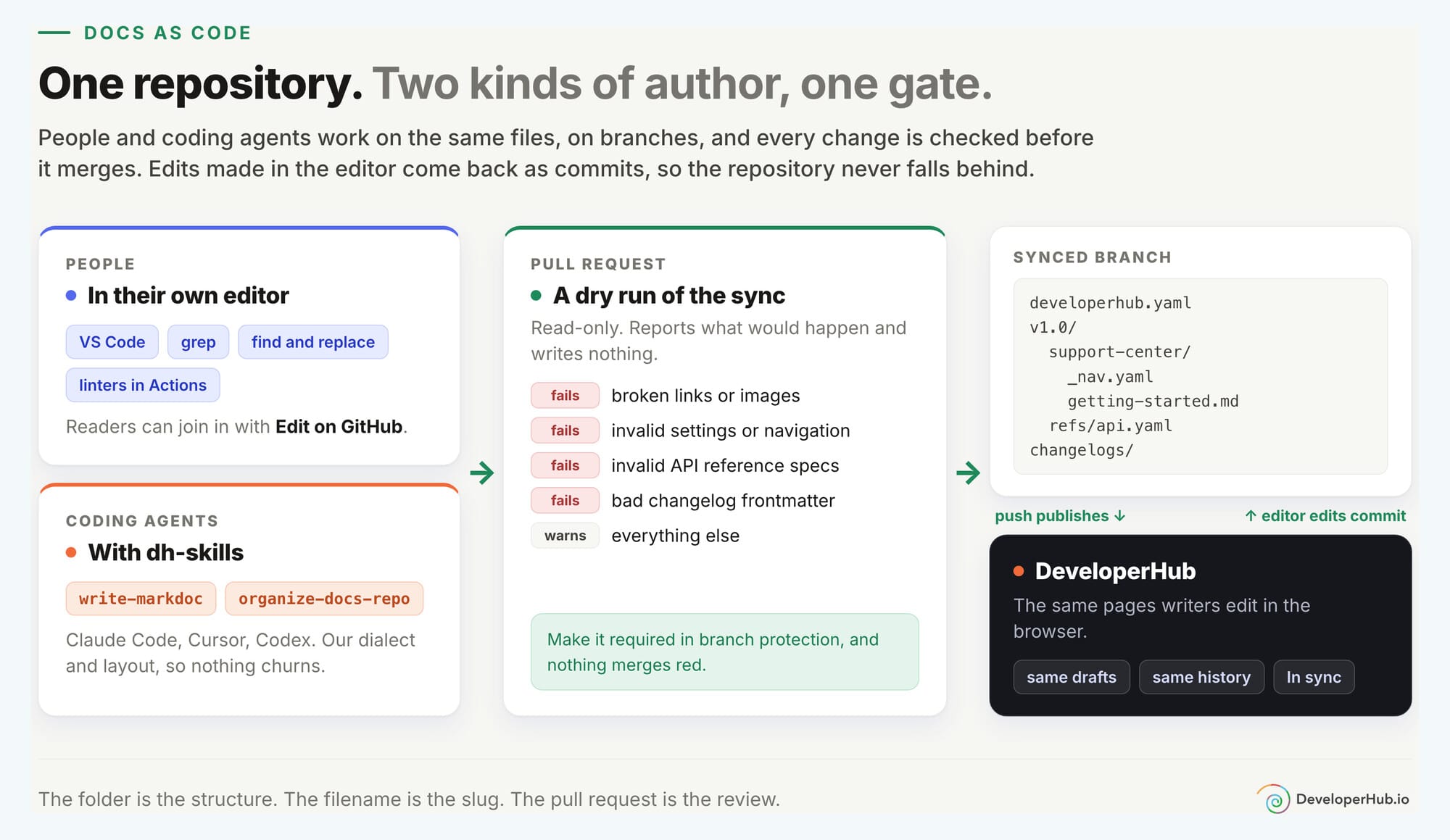
For people, it means your own editor, grep, find and replace across two hundred pages, a linter in GitHub Actions, and review in the pull request, exactly where your engineers already review everything else. Turn on Let readers suggest edits on GitHub and your readers get an "Edit on GitHub" link on every page too.
For agents, it is home ground. Claude Code, Cursor and Codex already know how to branch, diff, and open a pull request. What they do not know out of the box is our Markdoc dialect, so we publish that as an open-source skill:
npx skills add developerhub-io/dh-skills
In Claude Code, install it as a plugin instead so it keeps itself up to date:
/plugin marketplace add developerhub-io/dh-skills
/plugin install dh-skills@developerhub
It teaches the agent every block and the repository layout, so its changes sync back without churn or lost content. If you want to go further and have an agent keep your docs level with your product on a schedule, we wrote up exactly how we do it in Docs that keep up.
Best for: teams that review everything in pull requests, large mechanical edits, and agents that work best with files.
Worth knowing: it is GitHub only for now. Changelog posts and synced blocks have no draft state, so pushing one puts it live. And keep a move and a rewrite in separate commits, so the page's history and comments follow it to its new home.
So which one should you use?
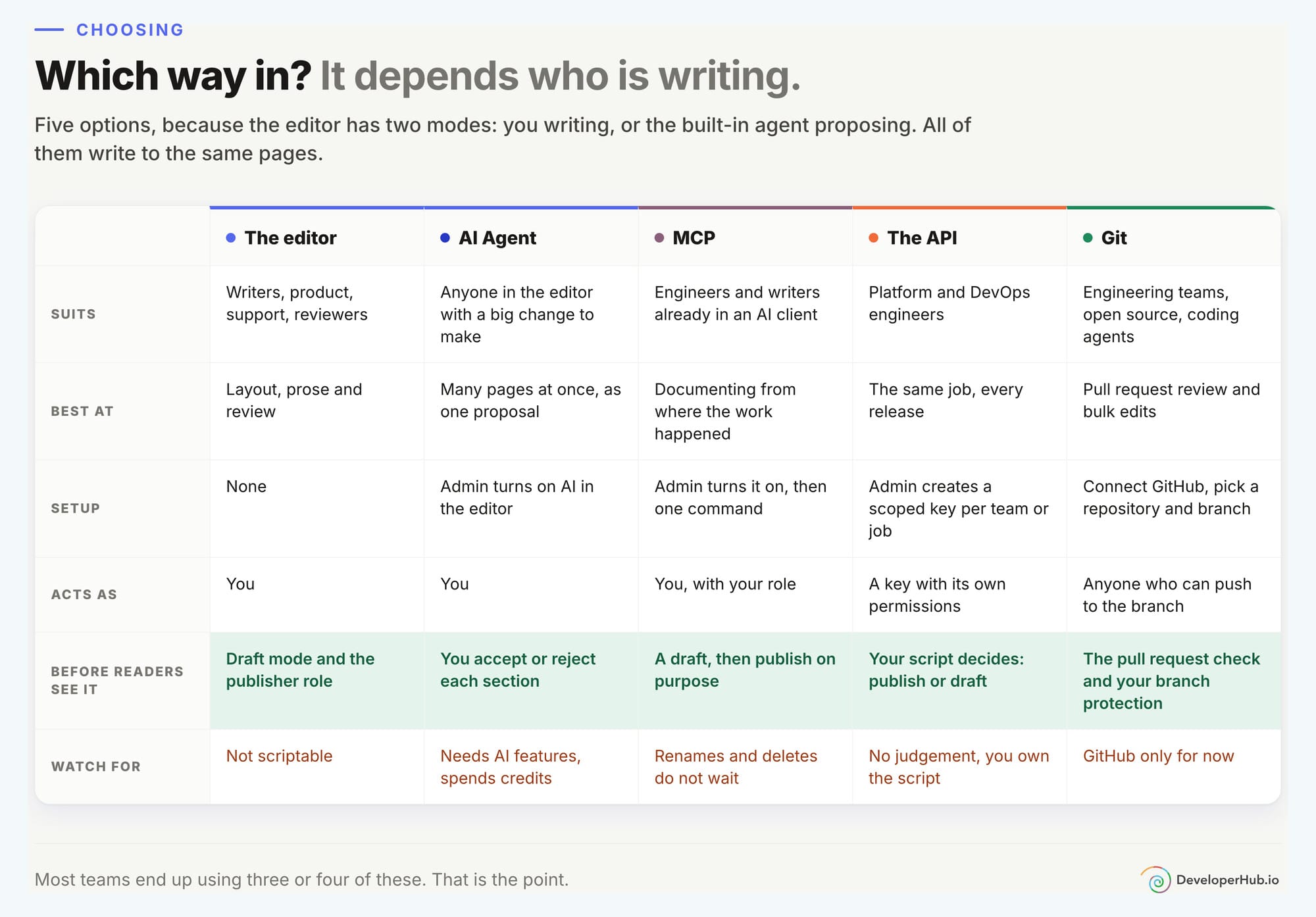
The short version:
- You are a writer, a product manager or in support. The editor.
- You need one change made across forty pages. AI Agent, and review the proposal.
- You just shipped the feature from your IDE. MCP, in the same session.
- You do the same thing every release. The API.
- Your team reviews everything in pull requests, or your agent lives in a repository. Git.
You do not have to pick one
The real answer for most teams is "all of them, by different people, on the same page".
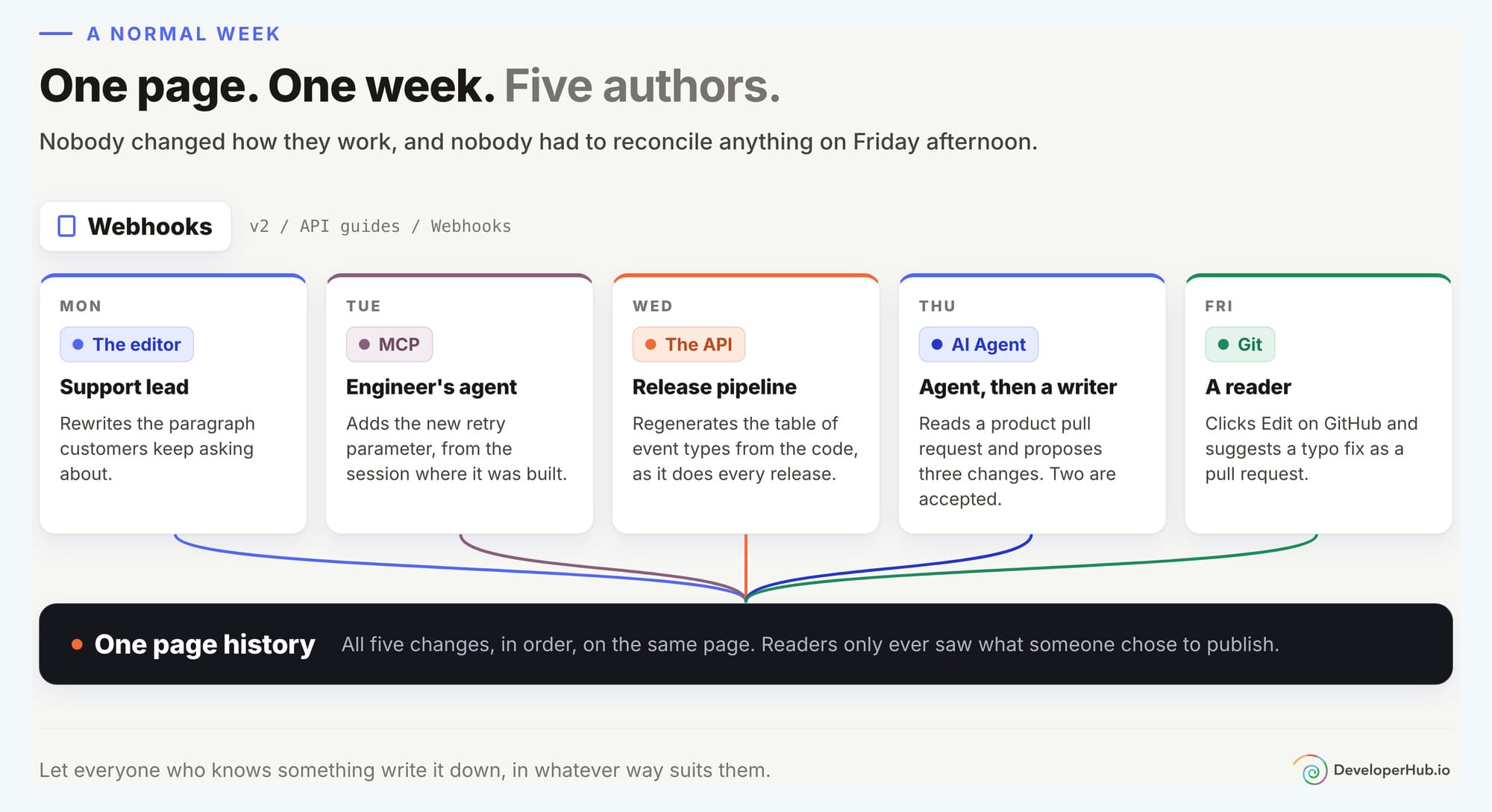
A support lead rewrites a confusing paragraph in the editor on Monday. On Tuesday an engineer's agent adds the new parameter over MCP, straight from the session where it was built. On Wednesday the release pipeline regenerates the table of event types through the API, as it does every release. On Thursday AI Agent reads a pull request on the product, proposes three changes, and a writer accepts two of them. On Friday a reader clicks "Edit on GitHub" and suggests a typo fix as a pull request, which syncs back the moment it is merged.
One page. One history. Five authors, and nobody had to change how they work.
That is the whole idea. Let everyone who knows something write it down, in whatever way suits them, and keep all of it in one place your readers can trust.
Where to start
- The editor: Writing Documentation, AI Agent and Self-Updating Docs
- MCP: Editor MCP Server
- The API: API Key and the API reference
- Docs as code: GitHub Sync and Writing Markdoc with AI Agents
Coming from somewhere else? You can import from Markdown, Markdoc, ReadMe, Mintlify, Zendesk, Confluence and Word, and then pick your way in from there.